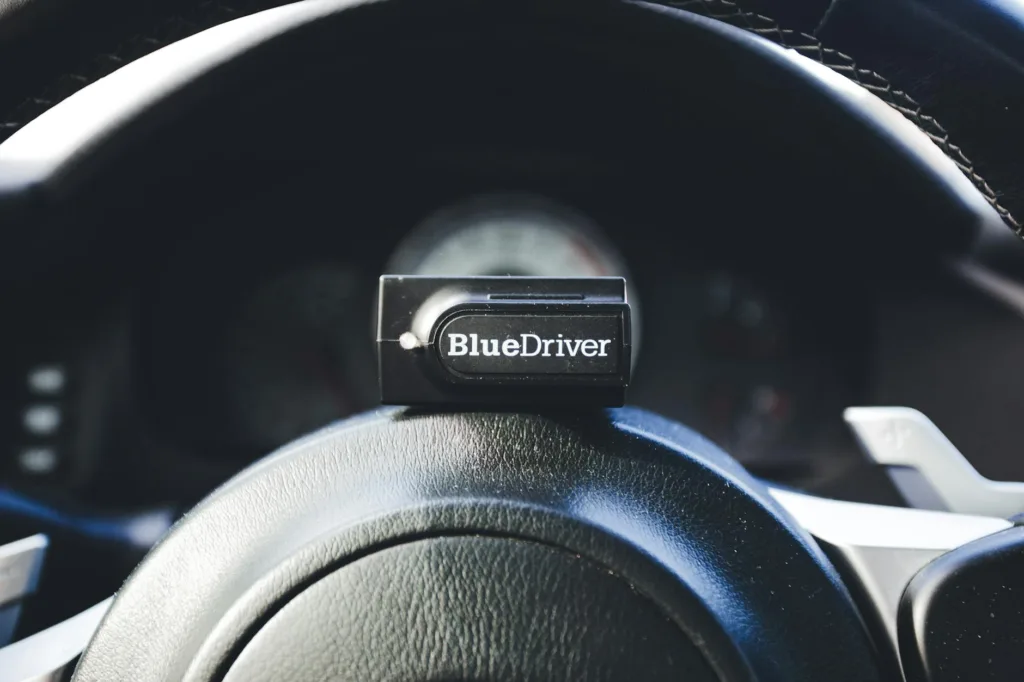
Hearing the dreaded check engine light and feeling that twinge of helplessness is the exact moment most beginners start hunting for an OBD2 scanner. New car owners want a quick way to read codes, interpret what the mechanic will say, and decide whether a trip to the shop is necessary. Beginners often make the same mistakes: they buy the cheapest Bluetooth dongle without checking app compatibility, or they pick a heavy-duty pro tool that’s overkill for simple engine codes. What matters most is clear diagnostics, ease of use, and compatibility with your vehicle and phone or computer.
Different buyers have different priorities. Some want a tiny plug-and-forget Bluetooth adapter to keep in the glovebox. Others prefer a handheld unit with a screen so they can diagnose problems without a phone. A few prioritize expanded coverage for ABS and SRS systems. My top overall pick balances accuracy, app support, and real-world usefulness for first-timers who want something that helps them decide whether to DIY or call the shop.
If you’d rather get a quick birds-eye view before the deep dive, the comparison table below gives a fast way to compare the top beginner-friendly options. Click any product name to jump to its full review and buying link.
Best OBD2 Scanner For Beginners Comparison Table
| Product | Best For | Main Strength | Key Specs |
|---|---|---|---|
| BlueDriver Bluetooth Pro (B00652G4TS) | Best Overall | Advanced diagnostics via mobile app, ABS/SRS support | Bluetooth, App, 1996+ gas vehicles, Repair reports |
| BlueDriver Pro Next Gen (B0GL9RL3XS) | Best Premium | Expanded vehicle coverage, verified fixes | Bluetooth, VIN-matched repair reports, 1996+ |
| FOXWELL NT604 Elite (B08PFJMTY3) | Best for Multi-System Scans | ABS, SRS, transmission and engine scanning | Handheld, Live Data, AutoVIN, Lifetime updates |
| ANCEL AD410 (B071FSNL73) | Best Value Handheld | Large DTC library, EVAP & O2 tests | 2.4″ color display, engine-only, 1996+ cars |
| FOXWELL NT301 (B00UJV3E12) | Best Live Data for Beginners | Live-data graphing and readiness checks | 2.8″ color screen, I/M readiness, 1996+ vehicles |
| Yakry OBD2 with Battery Tester (B0GL2FW97F) | Best for Battery + Engine Checks | Integrated 12V battery health tester | 2.8″ HD screen, battery test, live data |
| MOTOPOWER MP69033 (B07Z3HB7DR) | Best Budget Handheld | Simple, reliable engine code reading | 2.8″ LCD, DTC lookup, live data, 1996+ |
| VDIAGTOOL VD10 (B0BY1TS725) | Best Warranty/Support | Extensive compatibility and long warranty | Live data, freeze frame, I/M readiness, 5-year warranty |
| Autel AL319 (B007XE8C74) | Best Plug-and-Play | Trusted brand, one-click readiness | TFT color display, one-click I/M, 1996+ vehicles |
If you want more detail, the reviews below dig into real-world use, who each tool suits, and the tradeoffs to expect when you plug one into your own car.
1. Best Overall: BlueDriver Bluetooth Pro OBDII Scan Tool

One reason this option stands out is the way it turns your phone into a mechanic-grade diagnostic station with minimal fuss. Plug the Bluetooth sensor into the OBD-II port, open the BlueDriver app, and you get clear trouble codes, enhanced manufacturer-specific diagnostics, live data, and VIN-matched repair reports. I once used a BlueDriver on a neighbor’s car that threw a spurious misfire code; the app’s freeze-frame and live data helped me identify a dirty spark plug rather than an expensive coil replacement, saving us time and a trip to the shop. Another time, the ABS lamp came on during a rainy commute and BlueDriver pulled the ABS code that let me tell the shop exactly what to inspect.
For beginners, the app’s repair reports and suggested fixes feel like having a mentor in your pocket—step-by-step suggestions and likely causes reduce the guesswork. The wireless setup also avoids fumbling with cables under the dash, which is a small but meaningful quality-of-life win when you’re kneeling on the garage floor. The device supports ABS, SRS, TPMS and a broader set of systems on many makes, which means it’s ready if your needs grow beyond simple engine codes.
Pros
- Professional-level diagnostics in a compact Bluetooth dongle.
- Unlimited repair reports matched to your VIN, helpful for beginners.
- No subscription fees, clear mobile interface for iOS and Android.
- Supports ABS, SRS, TPMS and more on many vehicle brands.
- Wireless convenience avoids cable hassles.
Cons
- Some advanced features vary by make/model, check compatibility first.
- Requires a smartphone; no standalone screen.
If you want a single tool that grows with your skill level and gives readable repair guidance, BlueDriver is hard to beat. It’s ideal for beginners who want confidence interpreting codes and the option to explore deeper diagnostics without buying a handheld scanner. If you dislike relying on a phone, or need corded handheld operation, another pick may suit you better.
To buy this product, click here.
2. Best Premium: BlueDriver Pro Next Gen OBD2 Scanner

For buyers who prioritize long-term coverage and pro-level insight, this next-gen BlueDriver steps up the game. It keeps the same wireless convenience but expands vehicle coverage and verification tools. I used the Pro Next Gen when evaluating two different SUVs with intermittent transmission warnings; the app’s Mode 6 and enhanced live data gave repeatable evidence I photographed and sent to the mechanic. Another scenario: during a weekend road trip, it let me monitor fuel trim and coolant temp trends, which caught a slowly developing thermostat issue before the highway would have turned it into a tow.
The Pro Next Gen is for drivers who expect to diagnose more than once or two DIY jobs a year. The verified fixes and technician-backed reports can save money by steering you toward realistic repair options. It’s comfortable in the hands of a beginner who plans to learn, or an owner who just wants more depth without stepping up to an expensive dealer tool.
Pros
- Expanded diagnostics and verified repair reports tied to VINs.
- Wide automaker coverage and strong support network.
- No subscriptions, regular app updates keep compatibility current.
- Wireless and compact for everyday carry in the glovebox.
Cons
- Premium feature set may be more than casual users need.
- Relies entirely on your phone for display and interaction.
This model is a smart choice if you expect to diagnose multiple vehicles or want deeper data for troubleshooting. It’s less attractive if you prefer a tactile handheld device or only need the occasional code read. Choose it over the standard BlueDriver if you want broader coverage and more professional guidance built into the app.
To buy this product, click here.
3. Best for Multi-System Scans: FOXWELL NT604 Elite

If your plan is to skip dealer trips for the common warning lights, this FOXWELL is aimed at owners who want ABS, SRS, transmission and engine scanning in a single handheld unit. One scene that sells it: a family member’s car had a persistent SRS light after a minor fender bender. The NT604 isolated the airbag fault and let the shop technician target the repair instead of guessing. Another time it was used before a used-car purchase; AutoVIN retrieved the vehicle details quickly, and a full scan revealed a transmission code that saved the buyer from a costly mistake.
The NT604 Elite packs multi-system coverage into a user-friendly handheld with live data playback and a solid build. For beginners who plan to maintain their own vehicles or want a serious second opinion before a repair, it strikes a balance between price and capability. The unit doesn’t do dealer-level service resets, but it reads and clears faults across many control modules, which is what most home mechanics need.
Pros
- Reads ABS, SRS, transmission and engine systems from a single device.
- AutoVIN speeds setup and improves accuracy for different vehicles.
- Handheld unit with lifetime updates and solid build quality.
- Good value for multi-system scanning without dealership tools.
Cons
- Does not perform advanced service resets like ABS bleed or battery registration.
- Lacks the wireless convenience of Bluetooth dongles for mobile apps.
Buy the NT604 Elite if you want a dependable handheld that grows with your skill set and handles more than basic engine codes. It’s great for someone who prefers a dedicated scan tool with a screen and physical controls, and who values multi-system visibility over specialized service functions.
To buy this product, click here.
4. Best Value Handheld: ANCEL AD410 Enhanced OBD2 Scanner

For beginners who want a straightforward, plug-and-read handheld without app headaches, the ANCEL AD410 is a strong value. A quick real-life moment: I lent one to a friend who had a check engine light flick on after a long trip. In minutes she had the code, the built-in DTC lookup, and a clear readiness status for an emissions check. Another scenario: a DIYer used the AD410 to run EVAP and O2 tests while tuning fuel economy on a weekend project, finding small sensor fixes that improved highway mileage.
The AD410’s color display and large built-in code library make it easy to understand what the scanner reports without having to Google cryptic codes. It’s engine-focused, so it won’t read ABS or airbag modules, but that simplicity is part of the appeal for many beginners. It’s plug-powered so there’s no battery to replace, and the interface is designed to be intuitive for non-experts.
Pros
- Clear color display and 42,000+ DTC lookup library built in.
- Support for EVAP and O2 sensor tests, useful for serious DIYers.
- Plug-and-play handheld, no phone required.
- Multilingual support and solid brand track record.
Cons
- Engine-only diagnostics; does not read ABS/SRS/transmission codes.
- No wireless connection or app integration.
Choose the AD410 if you want a friendly, capable handheld that answers the usual check engine questions and runs a few extra tests. It’s a good match for drivers who want instant, on-device code definitions and straightforward testing without pairing to a phone.
To buy this product, click here.
5. Best Live Data for Beginners: FOXWELL NT301

For learners who want to see what the engine is doing in real time, the NT301’s live data and graphing are the standout features. I remember using this unit to troubleshoot a car that stalled at idle only occasionally; by graphing long-term fuel trims and misfire counts while cruising and idling, the NT301 exposed a pattern that pointed to a clogged injector. Another useful scenario is pre-inspection checks: the dedicated I/M readiness keys and LED indicator took the guesswork out of whether a car was ready for an emissions test.
It’s compact and rugged, and the interface is built for people who want both a quick code read and a deeper peek into sensor behavior. The NT301 is limited to engine-related and enhanced OBDII modes, but it graphs parameters in a way that makes learning what “normal” looks like much easier than staring at numerical values alone.
Pros
- Live data graphing makes trends and intermittent faults easier to spot.
- Dedicated I/M readiness keys and easy-to-read LED indicator.
- Sturdy handheld build, simple to operate for beginners.
- Lifetime updates and good support for a basic scanner.
Cons
- Does not scan ABS, SRS, or other non-engine modules.
- Graphs are useful but limited compared with high-end software tools.
Get the NT301 if you’re curious about sensor behavior and want to learn how the engine responds while driving. It’s an ideal educational tool for beginning DIYers who plan to experiment with live-data diagnosis and trend spotting.
To buy this product, click here.
6. Best for Battery + Engine Checks: Yakry OBD2 Scanner with Battery Tester
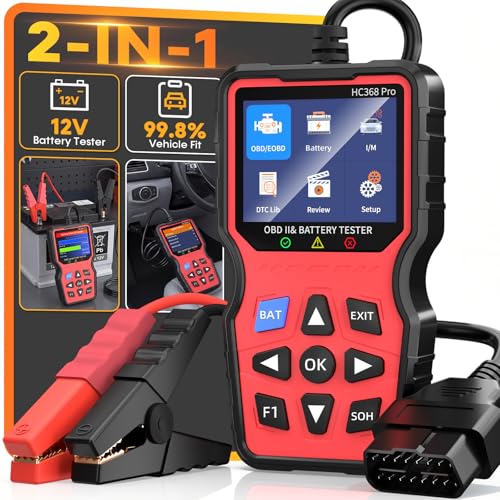
If you’ve been burned by a dead battery or a no-start situation, an OBD2 scanner that also tests the battery is hugely practical. I used the Yakry unit on a cold morning when a friend swore the car “should start fine.” The battery test revealed poor cold cranking amps and elevated internal resistance; a quick jump start got us rolling and the battery tester convinced us to replace the battery before the next freeze. Another time, a reluctant starter and a CEL together made it tempting to chase engine faults, but the combined battery and scan tests showed a weak battery was causing intermittent sensor resets.
The Yakry blends OBD2 diagnostics with SOC, SOH and CCA readings in a beginner-friendly interface, so you can rule in or out electrical problems without extra tools. Its color screen and icon-guided menus reduce confusion for first-timers. For drivers in climates with cold winters or anyone buying used cars, having both functions in one device speeds up troubleshooting and prevents wasted shop visits.
Pros
- Integrated battery health testing (SOC, SOH, CCA) plus OBD2 scans.
- Clear 2.8″ HD screen and icon-guided menus for beginners.
- Useful for pre-trip checks, used-car inspections, and winter prep.
- Live data and DTC definitions built in for straightforward diagnostics.
Cons
- Battery testing is valuable but not as deep as bench testers used in shops.
- May be more than needed if you only want occasional code reads.
Choose the Yakry if you want a combined tool that helps decide whether a problem is electrical or engine-related. It’s a practical pick for winter climates, road-trippers, and anyone who prefers an all-in-one troubleshooting device.
To buy this product, click here.
7. Best Budget Handheld: MOTOPOWER MP69033 OBD2 Scanner

If your priority is low cost and reliable basic function, the MOTOPOWER MP69033 delivers straightforward reading and clearing of engine codes with a clear 2.8″ display. I lent one to a college student worried about a check engine light before a long drive; the MP69033 gave the code and simple DTC lookup on-screen so the student knew it was a minor sensor issue and could make the trip. Another time while inspecting a trade-in, the scanner’s live-data curve helped confirm an intermittent sensor fault that the seller had overlooked.
This unit is compact, plug-powered, and has a no-frills UI that beginners find easy to learn. It supports the common OBDII protocols and gives access to freeze-frame and I/M readiness. For anyone who wants a reliable first scanner that won’t break the bank, this is a practical entry-level choice.
Pros
- Very affordable and easy to use for simple code reads and clears.
- 2.8″ display with live data and DTC lookup built in.
- Plug-and-play with no batteries required.
- Compact cable and sturdy construction for garage use.
Cons
- Does not support ABS or airbag diagnostics.
- Fewer advanced test options than higher-priced units.
Buy the MP69033 if you want a sensible, no-frills scanner for occasional troubleshooting and pre-trip checks. It’s a great backup tool and an excellent starter scanner for a new DIYer who doesn’t need multi-system support.
To buy this product, click here.
8. Best Warranty/Support: VDIAGTOOL VD10 OBD2 Scanner

For many beginners, peace of mind matters as much as features. The VD10 pairs broad compatibility with an unusually long five-year warranty, which is reassuring if you plan to use the device frequently or pass it along. I tested this reader during an evening roadside assistance call; the clear on-screen DTC definitions made explaining the problem to the tow operator much simpler. Another user story involves a first-time car buyer who scanned multiple test-drive vehicles and used the VD10’s vehicle info and readiness checks to compare them, avoiding a car with hidden issues.
The VD10 covers live data, freeze frame, I/M readiness, and supports across-the-board OBDII protocols. Its long warranty and accessible support make it a smart choice for someone who wants a budget-friendly, low-risk purchase and the ability to learn diagnostics without worrying about short-lived hardware.
Pros
- Extensive compatibility across OBDII protocols and broad vehicle coverage.
- Includes live data, freeze frame and I/M readiness checks.
- Five-year warranty offers excellent long-term assurance.
- User-friendly display and preloaded DTC lookup for beginners.
Cons
- Interface is utilitarian; not as polished as premium models.
- Limited to on-device functions; no app ecosystem for deeper analysis.
This is the tool to pick if warranty and solid baseline diagnostics are priorities. It suits drivers who want a dependable scanner for routine checks and occasional troubleshooting, with support that lasts well beyond the usual one-year window.
To buy this product, click here.
9. Best Plug-and-Play: Autel AL319 OBD2 Scanner

If you want a branded entry-level reader with dependable basics and a simple interface, the Autel AL319 is a classic choice. I keep one in a roadside kit because its one-click I/M readiness and quick code reads save time at gas stations and inspection centers. Another small victory came when a friend’s car had an intermittent engine light; the AL319 pulled live data and freeze-frame information that helped decide to replace a failing sensor before it caused a breakdown.
Autel’s reputation and the AL319’s ease of use make it an excellent first scanner. It’s plug-and-play with a color TFT display and built-in DTC lookup. It won’t replace a shop-level tool, but for clearing codes after repairs, checking readiness, and learning what the engine sensors report, it’s a sensible, reliable option.
Pros
- Trusted Autel brand with a simple, clean interface.
- One-click I/M readiness and quick DTC lookup onboard.
- Good balance of price and core functionality for beginners.
- No batteries or apps required; plug in and read codes quickly.
Cons
- Limited to engine diagnostics; lacks multi-system support.
- Less advanced live-data features compared with higher-end models.
Pick the Autel AL319 if you want a no-fuss, reputable tool for everyday code reads and basic diagnostics. It’s particularly useful for drivers who want a simple, reliable reader without the complexity of Bluetooth apps or advanced multi-system scanning.
To buy this product, click here.
Best OBD2 Scanner For Beginners FAQ
What is an OBD2 scanner and why should a beginner buy one?
An OBD2 scanner reads diagnostic trouble codes from your vehicle’s computer and shows live sensor data. For beginners, it removes the mystery of a check engine light by providing readable codes and sometimes plain-language repair suggestions. It helps you decide whether a DIY fix is possible or if professional service is required, and it can save time and money by avoiding unnecessary repairs.
Will any OBD2 scanner work on my car?
Most scanners support cars sold in the U.S. from 1996 onward, but compatibility can vary for European and Asian models across year ranges. Always check the product’s stated vehicle compatibility and the manufacturer’s notes for special coverage of certain makes or newer models. Bluetooth dongles may also require a specific app that lists compatible models.
Should I buy a Bluetooth adapter or a handheld scanner?
Choose Bluetooth if you want a lightweight device that pairs with your phone and offers rich apps. Go handheld if you prefer a dedicated unit with a built-in screen and physical buttons. Bluetooth tools excel at portability and advanced reporting, while handheld units are often simpler to use and don’t rely on a phone.
Can I clear a check engine light with a scanner?
Yes, scanners can clear stored engine codes. However, if the underlying issue remains, the light will likely return. Clearing codes is useful after a verified repair or to reset readiness monitors ahead of an emissions check, but it should not be used to mask unresolved problems.
What features should beginners prioritize?
Start with: reliable code reading and clearing, an easy-to-read display or app, I/M readiness checks for emissions testing, and live-data capability for basic troubleshooting. Battery testing or multi-system support (ABS/SRS) is valuable if those areas match your needs. Avoid overpaying for dealer-only reset functions you’re unlikely to use.
Do I need to update the scanner’s software?
Some handheld units and Bluetooth devices offer updates to expand vehicle coverage or fix bugs. If the manufacturer provides free updates, it’s a good idea to apply them occasionally, especially if you own a newer car. Always follow the vendor’s update instructions to avoid compatibility problems.
Are expensive scan tools worth it for a beginner?
Not usually. For most beginners, mid-range Bluetooth scanners or affordable handhelds provide everything needed for routine diagnosis. Expensive tools are aimed at professionals or serious hobbyists who need dealer-level functions and specific service resets.
How do I choose between similar low-cost scanners?
Compare readability, DTC database size, warranty/support, and whether the device requires a phone. Look at user reviews that mention your vehicle make and model. Prefer products with clear DTC explanations and easy menus for first-time users.
Final Verdict
For most beginners who want a friendly, capable scanner that grows with them, BlueDriver (B00652G4TS) is the best overall pick. It combines wireless convenience, app-based repair reports, and support for multiple systems on many makes, which gives new owners both clarity and confidence. If you prefer a physical tool with broader multi-system coverage, the FOXWELL NT604 Elite (B08PFJMTY3) brings ABS, SRS and transmission scanning into a single handheld package without moving to dealer-level pricing.
If budget is the main concern, compact handhelds like the MOTOPOWER MP69033 (B07Z3HB7DR) or the Autel AL319 (B007XE8C74) deliver reliable engine-code reads and readiness checks at a low cost. For drivers who frequently face battery or no-start issues, the Yakry OBD2 with battery testing (B0GL2FW97F) is a smart all-in-one choice. Match your purchase to how you drive and troubleshoot: wireless app tools for rich context and convenience, handhelds for standalone simplicity, and multi-system scanners if you want to avoid dealer visits for common warning lights. Whatever you choose, the right beginner-friendly OBD2 scanner turns a flashing light into actionable information and puts a lot of unnecessary worry behind you.